menu

Most bloggers ignore the data sitting right inside their Pinterest account. Here is how to read it like a content strategist and stop guessing what to write next. Hint: Let’s learn how to use Pinterest analytics for blog content planning.
As a business owner who blogs consistently for my own business PLUS tries to keep up with social (Instagram & Threads) PLUS writes weekly newsletters…. I know the drill. Every week, I log into my WordPress and just stare at a blank page. Then, I write whatever I can randomly come up with and then months down the line I realize I should’ve written about something else. There was something timely, something performing better on Google, something more helpful I could’ve written, but at that point it’s too late.
OR I sit down to ideate for more than this week’s post (maybe a month or a quarter) and just end up staring or doom scrolling because I cannot fathom how I’ll fill in all the days with content. The overwhelm paralyzes me, and I constantly second guess what I should be creating content about.
Here’s the thing: it doesn’t have to be that way. Creating a content plan for the quarter can be strategic and can be easier than you think especially if you’re in the lifestyle niche and have been posting on Pinterest for a year or more.
A strategic way to create a content calendar is right under your nose!
Pinterest is a search engine, not a social media platform. That means content that performs well on Pinterest (gets high outbound clicks, saves and impressions), is highly searchable. That content is being actively sought after by Pinners. Whether they’re typing it in the search bar or scrolling on their feed and stopping at your content, those Pin topics are WANTED by people not just something they scroll past.
Not only that, but the top-performing content you’ve created has authority on the platform. It has received enough engagement to signal that it is content worth ranking higher. If people are saving and clicking on a Pin, that indicates to Pinterest that the content is worth showing more people. It also indicates to Pinterest that you are a thought leader in that particular topic. Sally has a Pin about styling jeans and sneakers that is getting a lot of saves. so Sally must know a lot about styling jeans and sneakers.
If Sally is an expert at jeans and sneakers and creates more content about jeans or sneakers… those Pins will perform well because Pinterest has already clocked her expertise on the subject. Pinterest wants to serve it’s users with valuable content and all the saves act as proof that Sally has valuable content especially on this topic.
Understanding this can help unlock a new way of approaching Pinterest. It means that having Pins that perform well can be a result AND a starting point.
This is what people typically do when they have a Pin consistently perform well or go viral: they say “yay” and try to figure out how it happened to help another topic to perform just as well. While that is good and should be done… there’s a lot left on the table, when that’s all you do.
“The riches are in the niches” is so true on Pinterest. If you can go deep on a topic and consistently perform well for that, you will be able to rank faster each time you share pins about that topic. It rewards expertise because then it knows you are the go-to person for x.
Instead of saying what next thing can I make go viral, say how can I go deeper with this thing to build off of the momentum I already have. It’s not only a way to more quickly build you authority, but it’s also something so few creators are doing.
I’ll share examples on how to do that, but first we need to understand the way the Pinterest algorithm works and how we can learn more about how it decides what searches are applicable to what content.
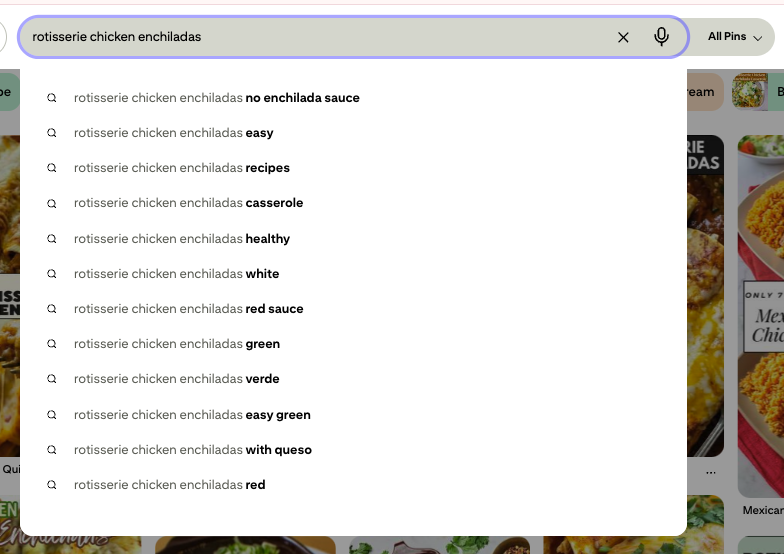
I think most people understand by now that you can use how people search on Pinterest to help your content rank. The word for this is “keywords.” You find keywords that match the way people phrase what they are looking for when your content is the answer. The search bar is a common way to find keywords and you see what populates underneath your initial search as well as the keyword bubbles below that.

Nothing wrong with using this method, but there is more… there is a way to find out not just how people are searching for your content but also how Pinterest is categorizing your content. Pinterest wants to put your content into its buckets so that it can more easily sort content to where it will be a good fit before it starts getting engagement signals to further identify its place.
Here’s a technical, Pinterest engineering blog with more info on that if you wanna nerd out.
The word for this is “annotations,” and these are a little more difficult to find, but once you do… there’s a wealth of useful information there.
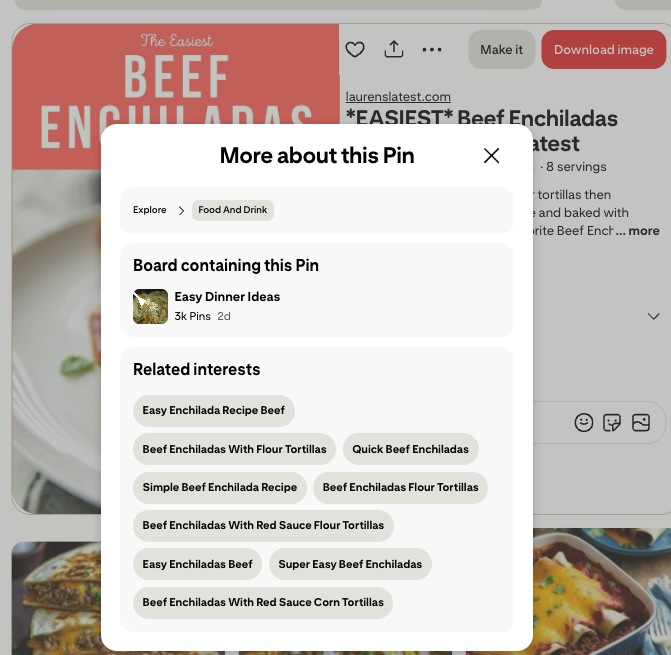
If you click through one of those bubbles you can then see the interest page, including the search volume for that phrase. SO much useful information on these pages.
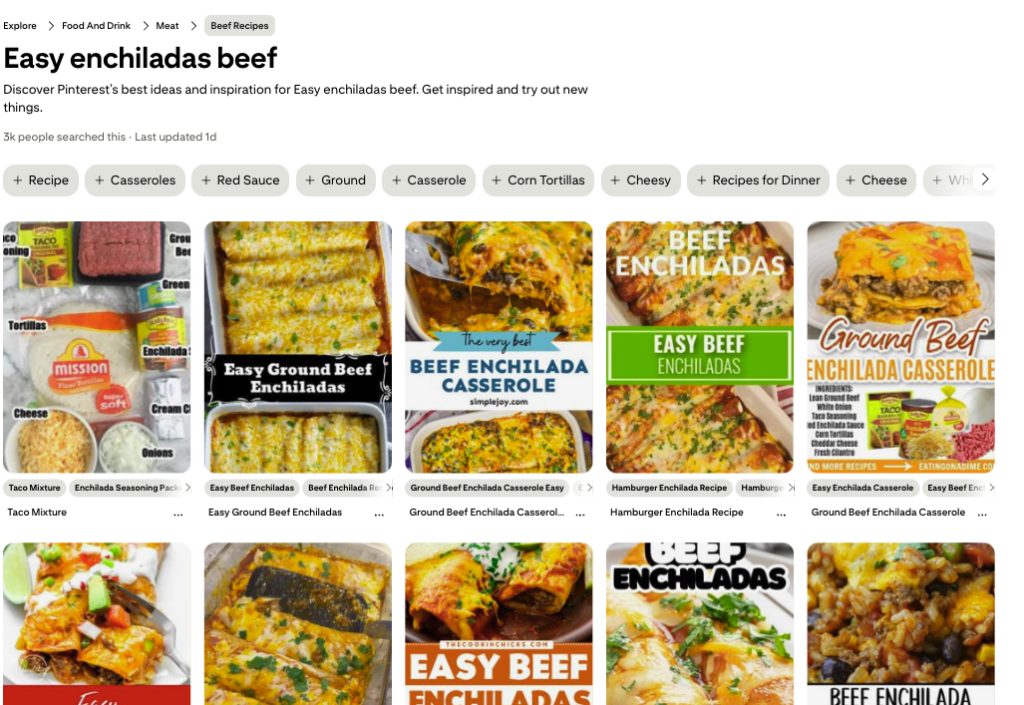
You can also use a tool called “Pin Inspector” that has a small one-time fee and has the ability to just drop in a pin link and find the annotations they’re tagged with AND each annotations search volume. See what it looks like for that same pin below:
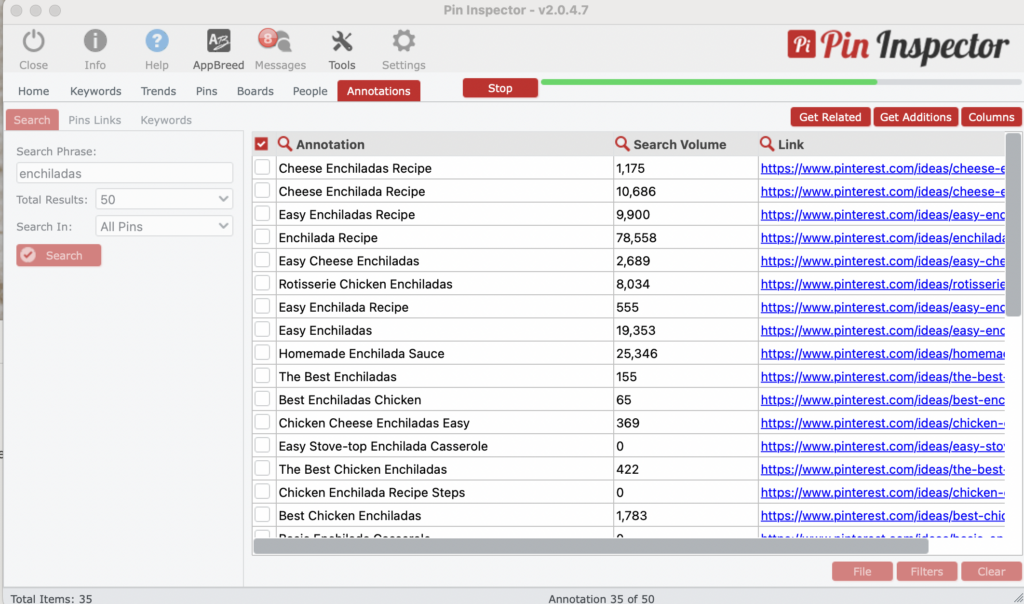
Now that you know how to learn more about the pins that are already performing well, let’s learn how to use Pinterest analytics for blog content planning. This is exactly what I do for my Pinterest Management and Content Creation Cheat Sheet clients
Pro tip: look for round up ideas i.e. “12 ways to style jeans and sneakers.” Round ups perform so well on Pinterest and are a quick way to repurpose content you’ve already created.
Everything I have walked through above is something you can absolutely do on your own. Pull your analytics, find your annotations, cross-reference with Pinterest trends, and build your content plan from there.
It takes a few hours the first time you do it. And if you are the kind of person who loves digging into data, you will probably enjoy it. If you would rather skip the spreadsheet and have a custom, data-backed content plan land in your inbox… that is exactly what the Q2 Content Creation Cheat Sheet is.
Every quarter, I analyze your top-performing pins, pull your Pinterest annotations and pull what will be trending in your niche and hand you 10 strategic blog post ideas… complete with suggested titles, search volume, and peak timing windows. Your entire Q2 content calendar, done.
The Q2 cheat sheet is $127 and closes March 31st, with delivery on April 3rd.
There are also 2 upgrade spots available where Eden from Maven Made Copy will write 6 full SEO-optimized blog drafts from your ideas, so you are not just planning Q2, you are showing up for it.
Q: Can I use this strategy even if I am new to Pinterest?
Yes. If your account is newer, you will have fewer top-performing pins to pull from, so I will lean more heavily toward the trending data side. Start by identifying what annotation clusters you want to build authority in, then create content that naturally lives in those categories from day one.
Q: How often should I go back and repeat this process?
Every quarter is the rhythm I recommend. Pinterest trends shift seasonally, and your analytics will evolve as your content library grows. Running this analysis every three months keeps you ahead of the curve instead of reacting to it.
Q: What if my top pins are all over the place with no clear pattern?
That is actually useful information. It usually means your content strategy has been broad rather than deep. Use this analysis as an opportunity to pick two or three topic clusters you want to own, and start building toward those intentionally. We can go deep on each of those topics for top pins which is only a good thing.
Q: Do I need a business account to access Pinterest analytics?
Yes. If you are a blogger driving traffic through Pinterest, you should have a business account set up. It is free to convert, and it unlocks your full analytics dashboard including outbound clicks, impressions, and the data you need for this process.