menu

I have seen a lot of Pinterest accounts in my 8 years of owning a Pinterest marketing business. I know exactly what a dormant Pinterest account looks like. You may relate: you set up an account in 2021 when there was a short lull in work, filled up your boards, posted consistently for about a 6 months (not perfect, but not terrible either). You saw some traffic and got hyped about what it could do. Then you ghosted the account entirely. You got busy with brand deals or real life, but now you’re seeing the effects of Google search changes and realize that you need an alternate traffic source. So how do you get Pinterest traffic again?
I know it can feel overwhelming to revive a Pinterest account. Can you just start posting when you’ve been quiet? Will it bring the same results as it once did? How can you create a Pinterest workflow that actually feels manageable?
Lucky for your, you’re not rebuilding from scratch. Pinterest probably has still been sending some traffic to your site, which is great data for you to use to start your refresh. Let’s get into the step-by-step tips for resetting your Pinterest account!
Pinterest is not social media, so if you’ve lost a lot of followers and/or have noticed your monthly viewers take a sharp dip, it’s not the end of the world. I promise! Pinterest would still show your old content if it had good SEO and good visuals and got good engagement back in the day. We want to keep that going and then build off of it.
It’s not to completely erase your past, we just want to reacquaint Pinterest with you as a creator and with your content. We are going to help it to get to know you again and there are strategic ways to talk to it and give it that feedback.
I always hate when people start with “reviewing and auditing,” but honestly it’s the only way to begin when it comes to Pinterest. You need to know exactly what your goals for Pinterest are now, in 2026. Think of your full blogging funnel. Make sure you have the following in place:
Here’s the thing: we can use Pinterest to drive a bunch of blog traffic, but if you don’t have a way to monetize and/or keep them in your community… it won’t be worth your time/money investment.
Side note: if you have completely switched niches (not just added or removed some topics)… I would start a Pinterest account from scratch rather than follow through with the below.
Before posting a single new pin, we need to refresh that Pinterest profile and make sure it reflects who you are in 2026. I like to remind people that Pinterest profiles rarely get seen by people, but they do very much make an impact when it comes to the Pinterest algorithm. Many places on the profile give the algorithm the information it needs to rank your content and put it in the right search results. Let’s go through each part that you’ll want to audit and/or update.
I only pin other people’s content to my clients boards in this step of the process. You want the boards to be understood by the algorithm when you start posting your content. In order to do that, you need to tell Pinterest what will be coming so that it can more quickly rank your content in the right searches. Here is how I would recommend you do that:
Here’s how we do step #3:
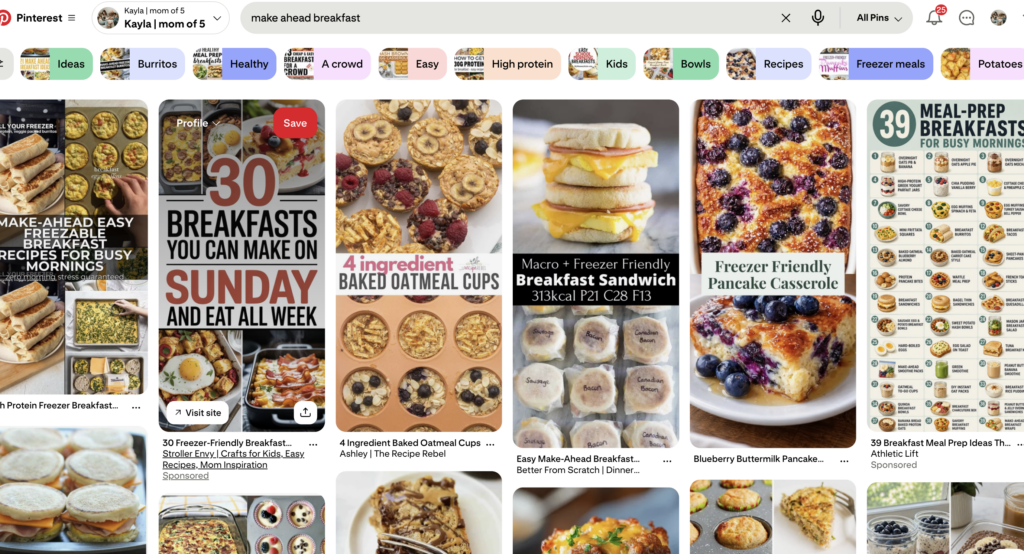
3. EITHER save the top 5 to your board from there OR (the better option), click the pin > click through to the website it was on > pin from the actual website to your board
4. Search another one of the keywords you included in your board description and do it for another 5 pins. For this example, search “easy breakfast ideas.”
5. Do the same thing for 1-2 more keywords and you’ve got 15-20 pins in your board.
* Side note: I wouldn’t do all 10 boards like this at once. Either schedule out these pins via Tailwind so it spreads it out or just do 3 boards/day until they’re all done. We don’t want to be bulk pinning and make Pinterest mad at us.
Here’s my #1 hack for how to get Pinterest traffic again: focus on what was working first. What I mean by that is to head to your analytics and look for the below:
If any of those pins have outdated or broken links, start by update the Pin itself and set up a redirect on your site, because if those pins are saved by others out there in the Pinterest universe, you cannot edit the other versions so you want to still capture the traffic.
If those posts are extremely old and outdated, the best case scenario is to update them. Either give them a full refresh or add text on that blog post that points them to a piece of content that is similar or would be useful to someone coming from that blog post. Just keep in mind how long Pinterest results last going forward, and be willing to update affiliate links, blog posts and more to accomodate.
When you’re left with some blog posts that still get Pinterest traffic, are still relevant and are now ready for new readers, it’s time to create some pins from them!
P.S. I’m still working on free blogging pin templates, but I do have affiliate pin canva templates that might be helpful in the meantime…
A refresh is a good time to make sure your pinning schedule is actually set up for success, because we want to make sure you don’t post and ghost again. Commit to my “Bare Pinimum” rule of 3 pins/day until that becomes second nature > move up to 5-10 pins/day.
I won’t lie to you: Pinterest can be time consuming, but do the best you can to be consistent so that you can see results which will motivate you to keep going!
For pinning the “Bare Pinimum”, you want to find 6 pieces of content to start with:
Then you want to use Canva pin templates to create 3 pins per piece of content and send them out like this:
6 days later, find 6 new links and do the same thing… Or create 4 pins/post and get 8 days worth of content rather than 6. Once you cycle through all the old top performers, just do 1/2 new content, 1/2 trending/seasonal content. Keep doing this until you’ve been pinning for 3 months every single day.
At that point you can review what’s working and what’s not. Do more of the former and less of the latter. That’s it. That’s Pinterest in a nutshell and how you can revive a dormant Pinterest account and get it back to being a traffic driver in your business.
If you’re seeing momentum in 3-6 months… meaning you’re seeing traffic, some sales, some subscribers coming from Pinterest, etc… ride that wave. Here are some ways you can do that:
Good luck, and happy pinning!