menu

I have been talking about how to use Pinterest for content ideas for the last couple of years now. I always feel like I’m the only Pinterest manager talking about it, but ten toes down on this in 2027 (and the rest of the year, of course). Here’s the thing Pinterest should not be where you only promote content you create. It should be where you go to get ideas for what to create. Once you get those ideas, make the content, you can then post it onto Pinterest exactly when people want it.
Pinterest doesn’t just tell you what people want. It also tells you when they are actively looking for it.
That kind of info isn’t readily available for the other search engine (Google), but it is for Pinterest IF you know where to find it.
I feel like there are stages in which a content creator learns Pinterest:
Today, I’m going to propose to use a “stage 6” that I truly never see talked about.
That is using Pinterest first before you create a single piece of content. Using it as a starting point for deciding what reels, TikToks, affiliate posts (ShopMy, LTK, Amazon) and blog posts to create that week, that month, that quarter.

If you’re any type of lifestyle creative, but especially in the niches I cover and Pinterest covers ad nauseam (fashion, beauty, home decor, travel and food)… you’re people are going to Pinterest first. They are going to the platform to get inspiration, to shop or to get information. If you’re giving out useful, helpful, curated inspiration or information and/or if you’re helping people shop more efficiently, Pinterest is a platform you should be active on. PERIOD.
That’s because the search engine allows your people to type in “simple dinner ideas for a family of 4” and find your content entitled “5 Simple Dinner Ideas for 4 People.” If learn the platform, that’s how it works when it werkssss.
Anyway, the point is Pinterest is different because people go there first.
When someone searches “cozy fall outfits” on Pinterest in July, they’re not browsing. They’re planning. They’re building boards, saving ideas, getting ready to buy. Pinterest captures that intent weeks, often months, before the same search shows up anywhere else.
Google shows you what people searched for. Pinterest shows you what people are about to search for. That’s a completely different kind of information.
And here’s the part that actually changes how I work with clients: Pinterest trends last nearly twice as long as trends on any other platform. Which means when you create content around something that’s building on Pinterest, you’re not chasing a 48-hour window like you are on Instagram or TikTok. You’re building something that compounds over months. I’ve seen years of trending
I’ve had clients with pins from two years ago still driving consistent traffic today. That’s not luck. That’s what happens when you build content around real demand instead of guessing what to post.
The other platforms will tell you what went viral today. Pinterest tells you what will be viral next week, next month, next season IF you know where to look.
That’s the whole reason I restructured how I manage Pinterest for clients. I felt like I wasn’t fully giving people what Pinterest could provide and what I, as an 8+ year Pinterest expert, can easily find.
In order to really get to the content ideation piece, there is a lot of discovering what Pinterest Trends tool is and kind of looking around at the different features so you can see what works for you (and what you don’t need to worry about so as not to get too overwhelmed).
Pinterest Trends is a couple things:
The best way to explain the Pinterest Trends tool is to follow along here while you open it up in a separate browser. I would actually like to scroll to the bottom of trends.pinterest.com to the “Search Trends” section because I think that’s the most useful for the average creator.
Once you get there click on “view search trends” to get the extended version of that section.
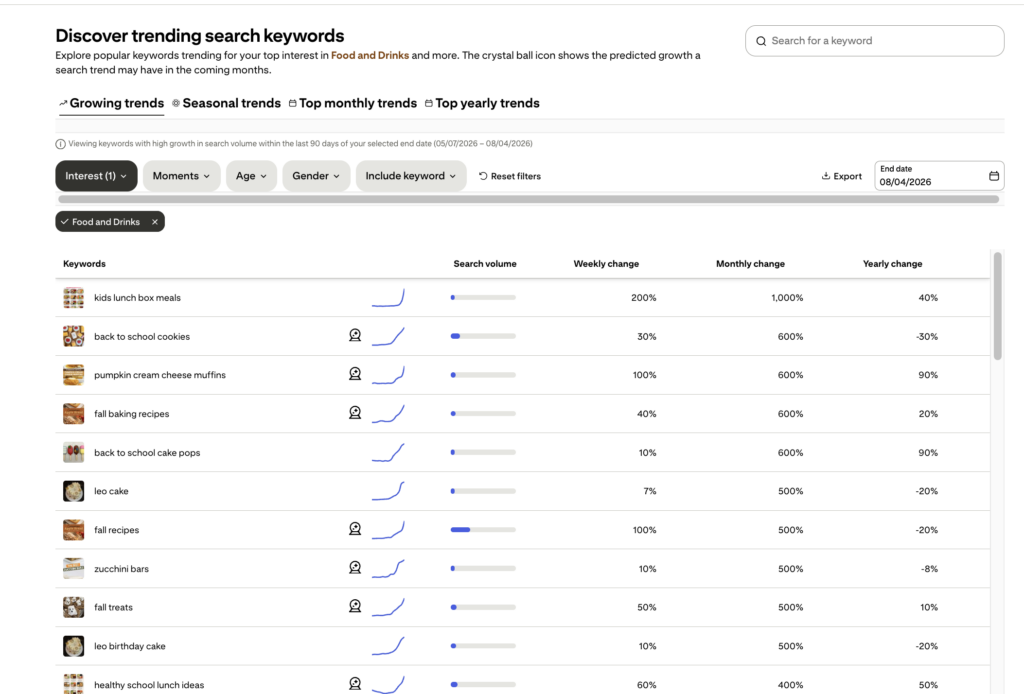
Here is where you can see so much info depending on what you want. If I were a creator in the food niche, I would start by checking “food and drink” in the “interest” dropdown and just taking a look around. You’ll see that there are a list of keywords that are all sorted by “monthly change” which is the growth rate of those keywords since the previous period.
Side note: depending on when you look at this tool, it can be a little outdated. I believe they update weekly, so if you’re on the 6th day of that week, you might see a holiday that has already passed or something else that is irrelevant to today’s trends.

If I was looking at what is trending up today, I would actually toggle on “weekly change” to be descending rather than “monthly change,” because that just gives you better insight.
If I were looking for future content ideas (which is what we’re talking about in this post), I would actually consider either searching specific seasonal keywords for upcoming seasons and I would look at the keywords that have a crystal ball symbol next to them, because those are marked by Pinterest as something they predict to be trending. Oftentimes, those are still too soon to really capitalize on, but sometimes there are options there.

Let’s say it’s August and technically still summer, but you know Pinterest is well into fall (as seen by the endless pumpkin-related keywords). You can start by searching some of those popular flavors, foods, cooking techniques that you know are coming up:
It will populate keywords and you just have to click the top one to see if soups are even relevant to when you’re trying to create content or if we’re too far past it. For example: “soup recipe” opens up to the below that shares searches are already rising for the keyword and the peak for content is October 27.

After that, Pinterest doesn’t predict much further, but looking at last year’s numbers, the keyword doesn’t really drop off until end of January/February, so it’s a long lasting topic.

As a food creator, I’d like seeing that and be excited to have a longer pipeline in which my content could get picked up on Pinterest. Since the peak is 2.5 months away from the current date I’m doing this content ideation, I think I still have time to create something, publish and then share on Pinterest.
Now that I know the general topic, I’m going to click some of the keyword bubbles below to check out the search volume and predicted trend peaks for soup-recipe-related topics. For example: “vegetable soup” and “hamburger soup.” I’ll keep clicking around and comparing different keywords until I get one that a) I want to create content on and b) still has a end-of-October peak or later.

Let’s say I decided on “hamburger soup.” I see that “hamburger vegetable soup” is also searchable, so I’m going to take both of those keywords to the search bar on the home page to see if I can gather anything else about what Pinterest users want to know about the topic.
These are what I’ll use to get my final blog post title and even some key things to include:


I would go with “Super Easy Crockpot Hamburger Soup Recipe.”
Okay, so now we have a blog post title and just need to make the content. I’m pretty sure you know how to blog so I won’t go into detail here. I will suggest you use that Pinterest dropdown in the search bar and/or Pinterest trends to pull some extra talking points or even some H2’s… that’s just more data of what people are searching for, so it’s worth exploring.
Pro tip: I’m the Pinterest SEO gal NOT the Google SEO gal. Take this name to your SEO keyword tool and pick whatever most aligns with Google if you have to choose between the two. Then, when you promote the post back onto Pinterest, use these works and the phrasing we already researched. Prioritize Google rankings because we can always do more Pinterest SEO work to help boost those when we promote it back on the platform.
Now here’s the unnatural thing: we’re going to press publish on the blog post even if it’s summer and we’re talking about sweaters. We’re going to post it because Pinners are planners which means we need that to go back onto Pinterest in the right seasonal moment.
We want to pin that blog post just as “soup recipes” starts to rise so that it has time to be understood by the algorithm and to be categorized and hopefully ranked by the time that peak of late October hits. It also gives us time to hit multiple angles with our pins.
Let’s do some smart promotion here that doesn’t require another blog post but instead requires getting the blog post OUT there for real. We want to use the blog post to create not 1 pin, but 20. Yeah, you heard that right. Luckily, we really only need 5 graphics and Tailwind will do the rest for us.*
Let’s take our soup recipe example. We head to Canva and our custom Pin templates that we’ve either paid Kayla to do (lol just email me if you want me to make you 10 on-brand Pin templates) or that we’ve made ourselves. We create 5 pins with different on-graphic text hitting a couple different angles.
Pro Tip: this is where your friend, Claude, comes in handy. If you do the Pinterest keyword research for this (aka collect 5 relevant keyword phrases that apply) and let it come up with pin titles and descriptions… you’ve got some starters for your text overlay.
*this is an affiliate link, so I will make a commission should you choose to purchase, but Tailwind is literally what I’ve used for 8 years, and it’s gotten even better this year.
Next up: add these to Pinterest. You’re going to want to add in all the stuff you need to add in for Tailwind and then go to “boards” for Pin 1 and select 4 boards. These 4 boards should be relevant. For this post, they should be something like:
If you do not have 4 boards this post can go to… you might need some more boards. That would be part of your Pinterest profile optimization strategy, but they can always be added as you find gaps in what buckets your profile covers. Having 4 buckets that this goes into gives Pinterest more context about this URL and what searches it makes sense to show up for.
Then, you want to select the interval to pin in Tailwind so you don’t have the same pin going out to a different board in a row.

Ignore the board names, but you get the picture. Pin 1 will go out every 9 days to these 4 different boards. The “Image Refresh” toggle does just what it says: “adds small, imperceptible changes to each Pin” which makes it fresh to Pinterest and not dramatically different to the average person. It’s 100% a hack for time-saving with Pinterest marketing.
For Pin 2, you’ll put that out NOT the next day but the day after that with the same 8 day interval, but instead of putting it to “crockpot recipes” first you’ll switch the order of boards:
And you’ll keep going:
…. and so on! See how that = 20 pins every other day for about 5 weeks? That’s called batch scheduling, and it’s serious!
Okay, so you probably aren’t going to write 1 blog post a day to cover all the trends and all the things. Sometimes you just want to share your old stuff on Pinterest, because repurposing is the whole reason you use Pinterest in the first place. Totally fair, and totally a part of what we believe and have always done for our Pinterest Management clients.
Just do all of the above, but with your backlog. Find trends that are relevant to content you already made. As long as they’re on their way up (even if they’re about to peak), they’re worth repurposing with that angle. Just make the graphics fresh, but switching up the format, colors, photos, AND/OR text overlay.
Than share them ASAP.
This will be the bulk of what you do on Pinterest so you don’t have to spend your time creating for Pinterest, but many people skip it and just share that 1 piece of content they created for their warm instagram audience that’s personality driven and wonder why Pinterest doesn’t work…
It’s my goal to get bloggers to understand the benefits of Pinterest for content creation. Thanks for hanging!